Dictate into any app
Typing is the slow part of writing.
Hit a shortcut and speak — your words land in whatever window has focus: email, docs, tickets, CRM notes, Slack, your IDE.
Write 3× faster, everywhere you already work.
Zoiper Scribe is one on-device app for live dictation into any window, automatic VoIP call transcripts, meeting summaries, live captions, and audio & video file transcription. Your audio never leaves your machine.
 Zoiper Scribe scribe — dictation
 Whatever your computer hears — what you say, what you're on a call with, what's playing on screen, or what's sitting in a file — Scribe turns it into text you can actually use.
Typing is the slow part of writing.
Hit a shortcut and speak — your words land in whatever window has focus: email, docs, tickets, CRM notes, Slack, your IDE.
Write 3× faster, everywhere you already work.
Replaying recordings to find one detail is painful.
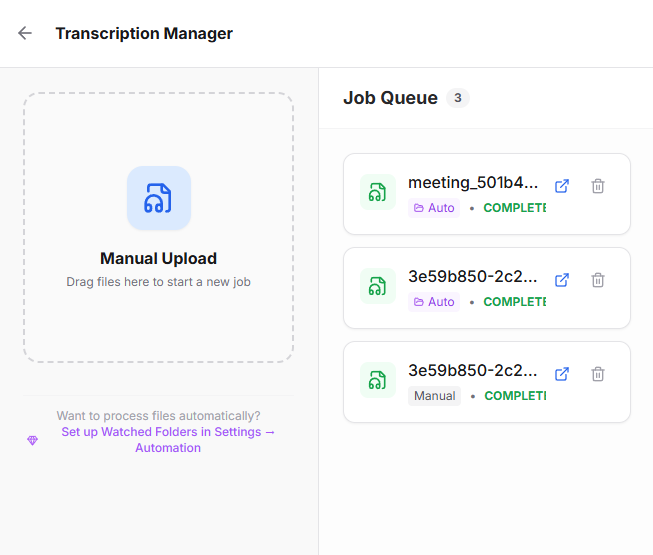
Point Scribe at your recordings folder and new calls transcribe and summarize themselves — automatically.
A searchable record of every conversation.
Hard-to-hear audio slows everyone down.
A floating subtitle strip captions whatever's playing — videos, webinars, screen-shares, podcasts, or a noisy call.
Follow every word, live.
Notes go missing; decisions get forgotten.
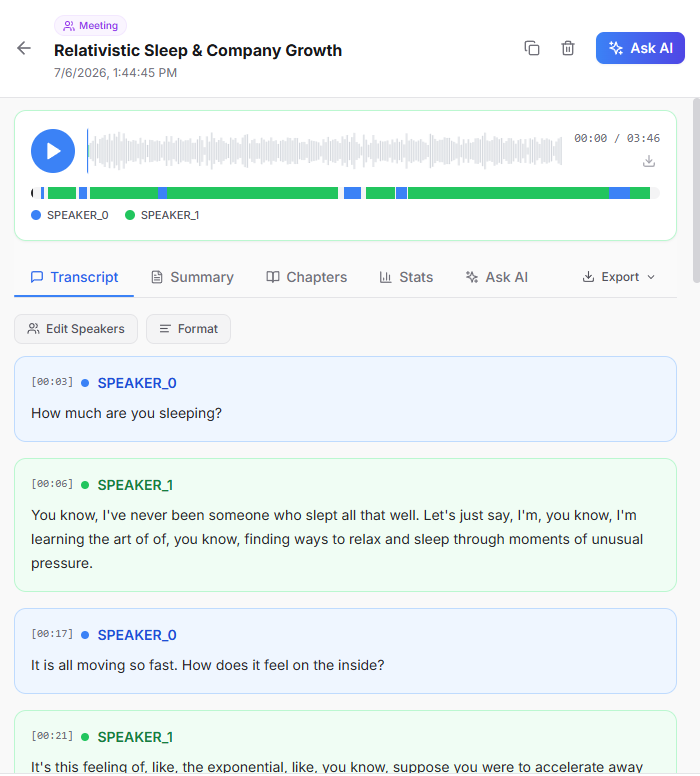
Capture meeting audio with permission, or drop in any file, and get transcript, summary and action items.
Leave every meeting with a record.
Hit a shortcut and speak. Your words land in the app that already has focus.
Capture meeting audio with permission, then get transcript, summary, and a searchable record.
Scribe can watch the recording folder and transcribe new calls automatically.
A floating subtitle strip for screen audio, video, podcasts, webinars, or hard-to-hear calls.
Drop audio or video files and get transcripts and summaries.
A scratchpad that listens when you want to think out loud.
Every source is opt-in, visible, and switched on by you.
Already recording calls in Zoiper? Connect Scribe once and never touch a recording again to know what was said.
It detects Zoiper, or you point it at any recordings folder.
A single opt-in to watch that folder — nothing happens until you allow it.
Each new recording becomes a transcript and summary — searchable, on your machine.
Works with watched folders and other softphones that write recordings to disk, such as MicroSIP and Linphone. Manage every source in settings, anytime.
Every transcript comes back structured, searchable, and ready to act on.
Find any word across every call, meeting and file.
Diarization tells you who said what, where available.
The gist in seconds — no replaying required.
Jump straight to the part that matters.
Decisions and next steps, pulled out for you.
TXT, SRT, VTT and more for wherever it needs to go.
Click a line to hear exactly what was said, where supported.
Ask questions and get answers from the record, where supported.
Capture every objection, price, promise and next step — never lose a deal detail to a missed note again.
A searchable history of every issue, with escalation notes you can hand off in seconds.
Walk out with the summary, the decisions, and the action items already written.
Draft email, docs, CRM updates, tickets and code comments at the speed you talk.
Follow hard-to-hear audio, webinars and screen-shares with live on-screen captions.
Keep searchable local records of conversations, where recording is permitted and consented to.
Recording and transcribing calls may require consent. Make sure you have the right to record before you do — this isn't legal advice.
Calls and meetings carry private information — names, numbers, contracts, complaints. Scribe transcribes it all locally, using on-device speech models. There's no cloud transcription service in the loop.
Audio sources are opt-in. Exports and shares only happen when you choose. Scribe may contact servers for licence and model downloads.
Transcription runs on your computer, not someone else's server.
Every source is opt-in and visible. Turn any of them off in settings.
Tuned for telephony and meeting audio, not pristine studio recordings.
Scribe is powered by Kroko.ai speech models — designed for conversational and telephony audio, and fast enough for live dictation and captions.
Handles noisy calls, packet loss, overlapping speakers and a range of accents.
Streams text quickly enough for live dictation and subtitles.
Low-confidence spans can be highlighted so you know what to double-check, where supported.
Lightweight enough to run on your machine.
13 run on Scribe's own on-device models, at full real-time quality. 21 more are in beta on open speech models — free for everyone while Scribe is in beta. Every one of them runs on your machine.
Open speech models, free during the beta — live quality varies by language.
* No live preview yet — files and push-to-talk only.
Not sure which language? Scribe can detect it for you.
More languages arrive over time, and the list can grow without an app update. Coverage follows Kroko.ai’s on-device models and the open speech models Scribe bundles.
Most tools solve one slice — dictation, or meetings, or files. Scribe covers all of them, on your machine.
| Capability | Zoiper Scribe | Cloud dictation tools | Meeting bots | Whisper front-ends |
|---|---|---|---|---|
| Dictation into any app | ✓ | ✓ | — | — |
| Automatic softphone call transcription | ✓ | — | — | — |
| Live subtitles for screen audio | ✓ | — | — | — |
| Meeting transcripts & summaries | ✓ | — | ✓ | — |
| Batch files / watch folders | ✓ | — | — | ✓ |
| Runs locally / on-device | ✓ | — | — | ✓ |
| No bot to invite to a meeting | ✓ | ✓ | — | ✓ |
| Built for telephony recordings | ✓ | — | — | — |
Categories shown for comparison.
Upgrade for automation, watched folders, meeting workflows and professional features.
For trying Scribe and everyday dictation.
For professionals who live in calls and meetings.
Shared workflows for sales & support teams.
Zoiper Scribe Pro is free for everyone while Scribe is in beta, not just existing Zoiper 5 customers.
Choose your platform
On-device processing — your audio never leaves your machine.